
Libraries and Capacitors
Goal
- input and output part
- actuator output part: e.g. servo motor, LED
- part that requires a library: e.g. remote control, capacitive touch, servo motor
- >1 library; otherwise, >1 sensor input and 1+ actuator output
- if using analogRead(), code that calibrates sensor readings
Schematic
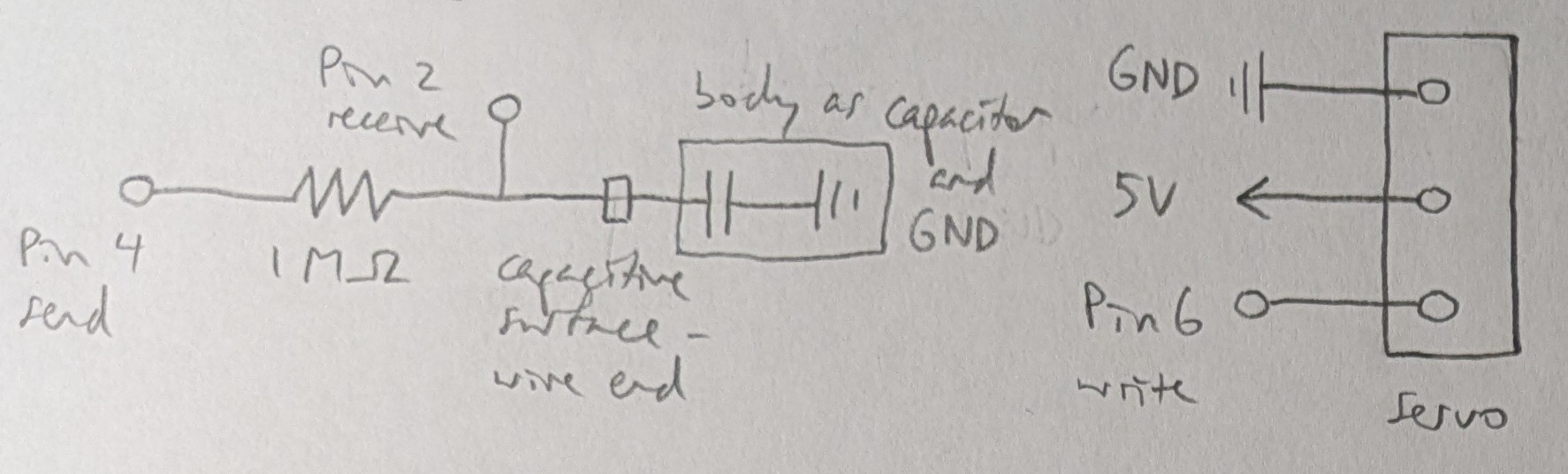
The capacitive surface for the sensor is the end of a wire.
The capacitor and ground for the sensor are the body of the person interacting with the circuit.
Resistance of 1 MOhm was chosen for the capacitive sensor based on the library guidelines for resistor choice to activate on touch contact.
Circuit
Firmware
Notes
-
-
We can address erroneous readings by only changing the output if the reading was not an error code.
CapacitiveSensor error codes are -1 or -2, and >= 0 otherwise.
// read in the capacitive sensor value over 30 samples of measurement long sensorValue // do not change the output if the read value was an error code if (sensorValue >= 0) { // rotate the servo depending on whether the sensor value passed the threshold if {} else {} } -
If the measurement is noisy and deviates from the true measurement by +/- 10%, we can take multiple readings and average them before each adjustment to get a smoother output.
  // average 5 readings of the capacitive sensor value over 30 samples of measurement
  long sensorValue = 0;
  for (int i = 0; i < 5; i++) {
    sensorValue = (sensorValue*i + cs_4_2.capacitiveSensor(30))/(i+1);
  }